

- OpenAI partners with Google to add invisible watermarks.
- New tool verifies AI-generated images using SynthID and C2PA.
- Verification tool checks images from ChatGPT and OpenAI API.
OpenAI has announced two new measures to address the growing problem of AI-generated misinformation. The ChatGPT maker revealed a partnership with Google to embed an invisible watermark called SynthID across all visuals created through its AI products. Alongside this, the company launched a public verification tool that lets anyone check whether an image was made using AI.
The tool works by reading two signals, SynthID and an open standard called C2PA, which leaves a traceable mark in the metadata of AI-generated images.
How Does OpenAI’s New Image Verification Tool Work?
According to a blog post by OpenAI, the tool currently works only for images generated through ChatGPT, the OpenAI API, or Codex, with plans to expand coverage over time. Users upload a single image in PNG, JPG, or WEBP format, and the tool checks for C2PA metadata, a SynthID watermark, or returns no supported signal.
ALSO READ: Is Apple Really Making ‘Barbie Edition’ iPhone 18 Pro? Here’s What The Leaks Say
The two systems work differently. C2PA, developed by a non-profit of the same name, founded in 2021, embeds signals in a file’s metadata, making it easier to strip out. SynthID, built by Google DeepMind, is designed to survive screenshots, resizing, and other manipulation attempts.
As OpenAI noted, “Watermarking can be more durable through transformations like screenshots, while metadata can provide more information than a watermark alone. Together, they make provenance more resilient than either layer would be on its own.”
Does OpenAI’s AI Image Detector Actually Work? We Tried It
There are plenty of tools in the market claiming to detect AI-generated images, but most deliver inconsistent results. We put this one to the test and came away impressed. We once needed a photo of Vanessa Trump, but the one we had was too small. To extend the background, we used OpenAI’s image tool.
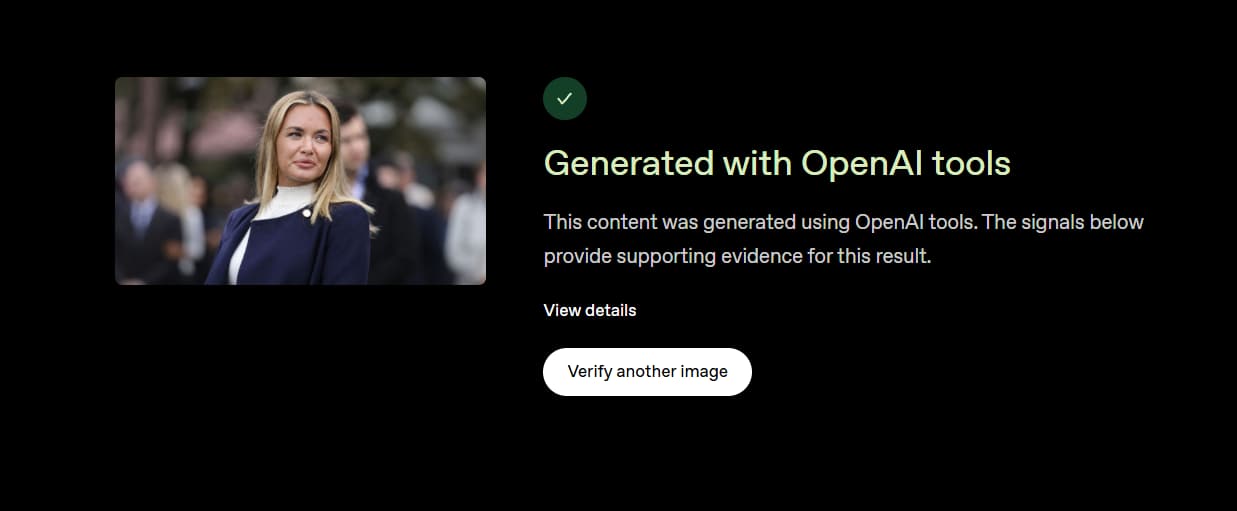
When we ran it through the verification tool, it flagged the edit right away, despite the image looking fairly original to the naked eye.
ALSO READ: Want To Hide Your WhatsApp Status From Certain People? Now You Finally Can

Using images created with OpenAI alongside original photographs, the tool correctly told the two apart, something most detection tools cannot reliably do. That said, it only detects images made through OpenAI’s own products for now, so it is not a complete solution yet. But within that scope, it holds up well.